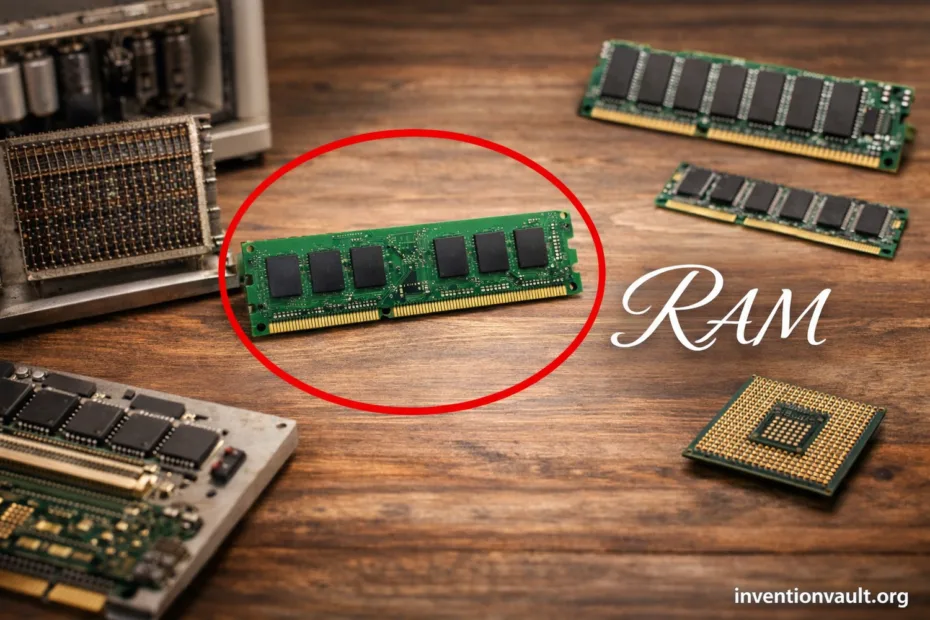
RAM Facts and Milestones
| Full Name | Random Access Memory |
| Core Idea | Any stored bit can be reached directly by its address, not by waiting for a sequence. |
| Main Role | Holds working data and active code so the CPU can access them quickly. |
| Volatility | Volatile memory: contents fade when power is removed (by design, not a flaw). |
| Earliest Widely Cited “True” Random-Access Digital Storage | Williams–Kilburn tube (Freddie Williams & Tom Kilburn), demonstrated in 1947; used in early Manchester computers. |
| Core Memory Era | Magnetic core memory was refined for practical use by the MIT Whirlwind team (often associated with Jay Forrester) and dominated many systems through the 1950s–1970s. |
| Semiconductor SRAM Milestone | Semiconductor SRAM design patented at Fairchild in 1963 (Robert Norman); early MOS-SRAM work followed in 1964 (John Schmidt). |
| DRAM One-Transistor Cell | Robert Dennard conceived the one-transistor DRAM cell in 1966; patent issued in 1968. |
| First Commercial DRAM IC | Intel 1103, introduced in October 1970, helped make solid-state main memory practical at scale. |
| First Commercial SDRAM Chip | Samsung KM48SL2000 (16 Mbit), built in 1992 and mass-produced in 1993. |
| DDR Standard Starting Point | JEDEC’s first DDR SDRAM standard (JESD79) began with June 2000 releases. |
| Modern Mainstream Forms | DDR4/DDR5 for PCs & servers, LPDDR for mobile devices, and GDDR/HBM for graphics and high-throughput workloads. |
| Common Physical Packages | DIMM (desktop/server), SO-DIMM (laptops), and BGA soldered memory (phones, tablets, many ultrathin devices). |
RAM is the computer’s active workspace. It’s where your system keeps the right-now pieces of an app—tables, textures, open documents, browser tabs—so the processor can reach them with minimal delay.
- RAM Facts and Milestones
- What Makes RAM Different
- Random Access, Real Meaning
- Volatile by Design
- Where RAM Sits in the Speed Ladder
- How RAM Stores Bits
- DRAM Cell
- SRAM Cell
- Main Families of RAM and Where They Show Up
- DDR Generations and What Actually Changed
- Reading a RAM Label Without the Confusion
- Speed Numbers
- Timing Numbers
- Compatibility Details That Matter
- RAM Inside Real Devices
- Everyday Computing
- Graphics and Accelerators
- Common Myths That Keep Coming Back
- Key Terms People Mix Up
- References Used for This Article
- Capacity shapes how much you can keep ready to use at once without constant swapping.
- Bandwidth influences how quickly large blocks move, which matters for integrated graphics and high-throughput tasks.
- Latency affects how fast small, frequent requests are served—think many tiny reads across complex software.
What Makes RAM Different
Random Access, Real Meaning
Random access doesn’t mean “unpredictable.” It means the system can jump straight to a location, read or write it, and move on. A CPU can fetch one byte, then the next request can be far away—no rewind, no waiting for a spinning track, no sequential scan. That direct addressable memory behavior is the heart of RAM.
Volatile by Design
Volatile memory fades without power because its storage is physical state—tiny charges or transistor configurations—meant for speed. That tradeoff enables fast read/write cycles and dense chips. Your files belong on persistent storage (SSD/HDD); RAM is for what the machine is doing this moment.
Where RAM Sits in the Speed Ladder
Computers rely on a memory hierarchy. Tiny memories close to the CPU are ultra-fast and small; larger memories are slower and cheaper per bit. RAM is the middle ground—vastly faster than storage, far larger than cache. It’s also why systems feel “snappy” when there’s enough RAM and feel strained when the OS must move data back and forth too often.
| Layer | Typical Use | Relative Access Feel |
| Registers | Immediate CPU work | Fastest (tiny, direct) |
| CPU Cache (L1/L2/L3) | Hot data and repeated reads | Very fast (keeps the CPU fed) |
| Main Memory (RAM) | Active programs, OS working sets | Fast (system-wide workspace) |
| SSD/HDD | Files, apps at rest, long-term data | Slowest (great capacity) |
RAM doesn’t make a processor smarter. It keeps the processor from waiting.
How RAM Stores Bits
Inside a RAM chip, each bit lives in a microscopic circuit. The exact circuit depends on the family: DRAM uses charge that must be refreshed, while SRAM uses a stable latch that holds state as long as power remains.
DRAM Cell
Dynamic RAM stores a bit as a tiny electrical charge. Charges leak, so the memory controller performs periodic refresh operations. That refresh overhead is the price of high density, which is why DRAM dominates main system memory.
- Pros: high capacity per chip, economical at scale, ideal for gigabytes.
- Tradeoffs: needs refresh, sensitivity to timing, higher latency than SRAM.
SRAM Cell
Static RAM stores a bit in a small latching circuit. No refresh cycle is required, which makes it fast and consistent. The cost is area: SRAM cells use more transistors, so density is lower and price per bit is higher.
- Pros: excellent latency, great for CPU caches and small fast buffers.
- Tradeoffs: lower density, not practical as multi-gigabyte main memory.
Main Families of RAM and Where They Show Up
“RAM” is a broad label. In everyday devices, most of it is DRAM in one of several forms. The form factor changes—DIMM, soldered packages, stacked dies—but the purpose stays the same: keep data close enough for fast access while software runs.
| Family | What It Optimizes | Common Places |
| DDR SDRAM | Balanced bandwidth and capacity for general computing | Desktops, laptops, servers (DIMM/SO-DIMM) |
| LPDDR | Lower power, high efficiency, tight packaging | Phones, tablets, thin laptops (often soldered) |
| GDDR | High bandwidth for massively parallel graphics workloads | Discrete GPUs, some accelerators |
| HBM | Extreme bandwidth per watt via 3D stacking | High-end GPUs, AI/HPC accelerators |
| SRAM | Lowest latency for tiny, high-speed storage | CPU caches, microcontrollers, on-chip buffers |
| Emerging Non-Volatile RAM Types | Persistence with RAM-like access in specific roles | Niche devices, research and specialized systems (not typical main memory) |
DDR Generations and What Actually Changed
DDR generations are often reduced to one word—“faster.” The real shift is architectural: wider internal pipelines, smarter bank handling, and better signaling so the memory controller can keep multiple operations in flight. Bandwidth rises over time, while latency behavior depends on timings and the platform’s memory controller, not a single headline number.
DDR (original) set the pattern: transfer on both clock edges for higher throughput. DDR2 and DDR3 refined prefetch and signaling. DDR4 improved efficiency with bank-group architecture. DDR5 reshaped the DIMM into two independent subchannels and moved power regulation onto the module with a PMIC.
| Generation | Practical Focus | What Users Notice |
| DDR | Double-edge transfers, standardized baseline | Big step up from older SDR memory in throughput |
| DDR2 | Higher effective rates with architectural updates | More bandwidth headroom; timings often looked “larger” |
| DDR3 | Efficiency and scaling into higher capacities | Smoother multitasking with larger kits |
| DDR4 | Improved bank handling and better efficiency at scale | Strong mainstream balance for PCs and servers |
| DDR5 | Two subchannels per DIMM, on-module power management, higher density trajectory | Better throughput in bandwidth-heavy work; platform choice matters a lot |
Reading a RAM Label Without the Confusion
A RAM kit label is a compact story about speed, timings, voltage, and form factor. Those details exist so systems can match electrical limits and still deliver predictable performance. The trick is knowing which parts change real-world behavior and which parts are simply compatibility markers.
Speed Numbers
Modern memory is often described in MT/s (mega-transfers per second). Higher MT/s increases bandwidth. That can help when the system moves large blocks—video editing caches, integrated graphics frames, big datasets. Small interactive tasks can be more sensitive to latency than raw throughput.
Timing Numbers
Timings like CL describe cycles needed for certain operations. A timing value can’t be judged alone because cycles occur at a given clock. What matters is the combined picture: frequency plus timings. This is where many people get tripped up and start reading labels like fortune cookies.
Capacity is still the first gate. If your workload regularly runs out of memory, the machine falls back to storage-backed paging, and the user experience can turn choppy. When there’s comfortable headroom, you can focus on matching memory generation and stable settings for your platform’s memory controller.
Compatibility Details That Matter
RAM is picky because it’s electrical. Slot type, signaling, and module organization must align. A stick that “fits” physically is still the wrong part if the generation or notch is different. Keep an eye on DDR generation, form factor (DIMM vs SO-DIMM), and whether the system expects ECC support.
- Generation match: DDR4 and DDR5 are not interchangeable; the slot keying protects the board and the module.
- Form factor: SO-DIMM is shorter for laptops; desktop boards typically use full-size DIMMs.
- Channels: Many systems perform best when matched modules populate channels evenly, allowing parallel acces patterns the controller expects.
- ECC: True ECC uses extra data bits and platform support; it’s different from on-die correction that may exist inside some DRAM chips.
About profiles: Many modules advertise optional performance profiles (often known as XMP or EXPO). They’re simply pre-defined settings, not magic. Stability depends on the CPU’s memory controller, motherboard design, and the exact kit.
RAM Inside Real Devices
In a desktop PC, main memory is typically modular DDR on a motherboard. In a phone, it’s usually LPDDR packaged close to the system-on-chip for efficiency. In a graphics card, memory is optimized for sustained, wide transfers—GDDR or HBM—because the workload is parallel and bandwidth-hungry.
Everyday Computing
Web browsing, office work, coding, and general multitasking tend to benefit most from adequate capacity and sensible latency. Once capacity is sufficient, gains from higher bandwidth can be real but workload-dependent. The OS also uses RAM for file caching, which is why unused memory isn’t necessarily “wasted.”
Graphics and Accelerators
GPUs prefer memory systems that stream massive amounts of data. That’s why bandwidth is often the headline metric for graphics memory, while the programming model hides many latencies through parallelism. HBM pushes this further with stacked dies and wide interfaces for bandwidth per watt.
Common Myths That Keep Coming Back
- Myth: “More RAM always makes a computer faster.” Reality: more capacity helps when you were short; beyond that, speed comes from many parts working together.
- Myth: “Higher MT/s always beats lower MT/s.” Reality: timings, controller design, and workload can make results surprising.
- Myth: “On-die correction equals ECC memory.” Reality: true ECC involves extra bits and platform-level handling, not just internal chip behavior.
Key Terms People Mix Up
| Term | Meaning |
| Bandwidth | How much data can move per second; strongly linked to MT/s and bus width. |
| Latency | Delay before data begins to arrive; shaped by timings, clocks, and controller scheduling. |
| Channel | A pathway between memory controller and RAM; multiple channels enable more parallel transfers. |
| Rank | A group of DRAM chips that respond together; affects density and how the controller interleaves access. |
| DIMM / SO-DIMM | Module form factors for desktops/servers and laptops; both can hold the same DDR generation but differ physically. |
| Swap / Paging | OS moves memory pages to storage when RAM pressure is high; it keeps apps alive but feels slower. |
References Used for This Article
- U.S. Patent and Trademark Office — JEDEC Standard (DDR SDRAM Specification PDF): Summarizes the JEDEC DDR SDRAM specification and explicitly references the June 2000 release.
- Computer History Museum — Williams-Kilburn Tubes: Explains the 1947 Williams–Kilburn tube as an early high-speed electronic random-access memory.
- Computer History Museum — Magnetic Core Memory: Documents how coincident-current core memory enabled practical, reliable main memory in early systems.
- Smithsonian National Museum of American History — Mainframe Computer Component, Whirlwind Magnetic Core Memory: Provides museum documentation for Whirlwind-era core memory hardware and its coincident-current design.
- MIT Museum — Whirlwind Core Memory Unit: Catalog entry connecting Whirlwind to early core-memory implementation and real-time computing needs.
- Intel Timeline — The Intel 1103 DRAM: Describes the Intel 1103’s October 1970 introduction and its role in making semiconductor main memory practical.
- Computer History Museum — Semiconductors Compete with Magnetic Cores: Contextualizes the shift from magnetic core memory to DRAM-based semiconductor memory in the early 1970s.