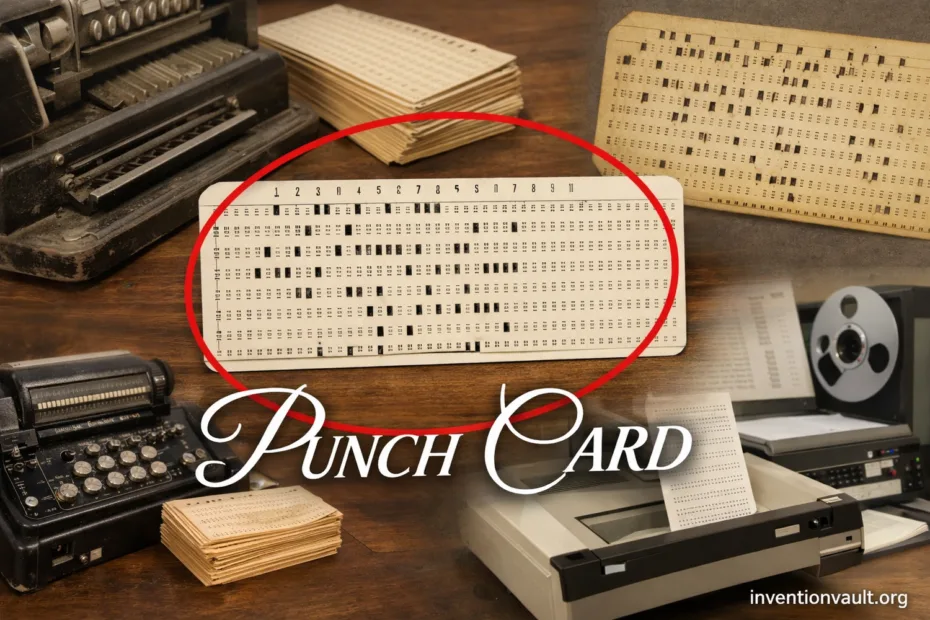
| Detail | Information |
|---|---|
| Invention Name | Punch Card (punched card) |
| What It Is | A machine-readable sheet of stiff paper where holes represent data or instructions. |
| Early Roots | Textile control evolved from perforated tape (1725) to chained punched cards (1728), then the Jacquard card chain (patented 1804). |
| Data-Processing Breakthrough | Herman Hollerith patented an electro-mechanical tabulating system in 1889, then punch cards scaled up large statistical work in 1890. |
| Classic Business Card Format | The widely recognized 80-column card (introduced 1928) measured 7⅜ × 3¼ in (about 187.3 × 82.6 mm) with rectangular holes and 12 rows. |
| How Meaning Is Stored | Meaning comes from position: a column is a character/field location, and the punched row(s) in that column encode a digit, letter, or symbol. |
| Typical Workflow | Punch → verify → sort → read → tabulate or compute. |
| Peak Use | Most visible in mid-20th-century business and early computing, when batch processing and paper-based audit trails mattered. |
| Notable Variants | 45-column round-hole cards, 90-column designs, 96-column System/3 cards (1969), mark-sense cards, aperture cards, and stub/short cards. |
Punch cards look simple, almost humble. Yet a single card can act as a compact contract between a person and a machine: this is the value, this is the label, this is the action. For decades, stacks of punched cards quietly carried payrolls, inventories, research data, and early software—one column at a time.
- What You Hold
- What the Machine Sees
- How a Punch Card Holds Data
- What a “Column” Usually Means
- Milestones That Shaped the Medium
- Main Punch Card Families
- Textile Control Cards
- Hollerith-Style Data Cards
- The 80-Column “IBM Card”
- High-Density and Special Formats
- Machines Built Around Punch Cards
- Core Equipment in a Card Workflow
- Why Punch Cards Scaled So Well
- Limits That Became Design Lessons
- Modern Echoes of the Punch Card Idea
- Data Habits We Still Use
- Interface Ideas That Persist
- Preservation and Handling
- Common Questions
- References Used for This Article
What You Hold
A punch card is stiff paper stock with pre-printed guides. Many formats add a corner cut so operators can spot orientation at a glance. The card is meant to be handled, filed, and sorted, so it balances durability with clean edges for reliable feeding.
What the Machine Sees
Machines ignore the printing and focus on holes and timing. As a card moves, sensors (mechanical, electrical, and later optical) detect where the card is and which positions are punched. That transforms cardboard into structured information the equipment can count, copy, or compute.
How a Punch Card Holds Data
Most data-processing cards are organized as a grid: columns run left-to-right, while rows run top-to-bottom. A column usually represents one character position or one field slot. The punched row or combination of rows inside that column represents the value. In practice, this let systems represent digits cleanly and extend to letters using zone punches.
Typical 80-column layout (conceptual)

Columns:  1  2  3  4  5  ...                         80
Rows:    [12][11][ 0][ 1][ 2][ 3][ 4][ 5][ 6][ 7][ 8][ 9]

One column = one character space
Punches within the 12-row stack = the encoded character
What a “Column” Usually Means
- Text fields: one column per character, often printed with a guide so people can read it.
- Numeric fields: multiple columns form a number; machines can add those columns using accumulators.
- Flags: a single punched position can act as a yes/no indicator inside a defined column range.
Milestones That Shaped the Medium
| Year | What Happened | Why It Mattered |
|---|---|---|
| 1725 | Perforated paper tape used to control a loom. | Showed that holes can represent repeatable instructions. |
| 1728 | Chained punched cards expanded loom control. | Cards became a modular “program” you could reorder and replace. |
| 1804 | Jacquard mechanism patented using a chain of punched cards. | Industrial-scale proof that punched patterns can drive complex, high-precision work. |
| 1889 | Hollerith patented an electro-mechanical tabulating approach. | Shifted punched media from instructions to mass data. |
| 1890 | Round-hole statistical cards used at national scale. | Proved punched cards can support very large workflows with repeatable accuracy. |
| 1928 | The 80-column rectangular-hole standard appeared. | It became teh familiar card format most people picture today. |
| 1969 | A compact 96-column high-density card launched for IBM System/3. | Showed that even within paper, designers kept pushing density and speed. |
Main Punch Card Families
Textile Control Cards
In textiles, a punched card chain acts as a physical pattern library. Each card corresponds to a step in the weave, and the presence or absence of holes decides which threads lift. It is a clear, early example of programmable control—built from paper and patience.
Hollerith-Style Data Cards
Hollerith-style cards store records rather than patterns: each card can represent one person, one transaction, or one inventory line. Early statistical cards used round holes in a defined grid (notably 12 rows by 24 columns in the 1890 era). The important shift was cultural as much as technical: data became portable, sortable, and countable.
The 80-Column “IBM Card”
The iconic 80-column card standardized around a comfortable human scale and a precise machine path. Its familiar dimensions (7⅜ × 3¼ in) helped filing, feeding, and long-term storage. With rectangular punches and 12 rows, it supported dense coding while remaining readable to trained operators.
High-Density and Special Formats
- 90-column cards squeezed more characters by encoding two per column in certain designs, trading simplicity for capacity.
- 96-column cards (System/3) used a tighter layout with smaller punches to increase density in a smaller card.
- Mark-sense cards let people fill printed ovals, then machines converted marks into punched data.
- Aperture cards combined a punched index with mounted microfilm so one piece could hold both a reference and an image.
- Stub and short cards were scored so parts could tear away, making handling and batching more flexible.
| Format | Typical Hole Style | Typical Use | Notable Trait |
|---|---|---|---|
| Jacquard chain | Variable | Weaving control | Instruction sequence as a physical loop |
| Early statistical | Round | Counting/tabulation | Strong focus on categorical data |
| 80-column | Rectangular | Business + computing | One column per character; filing-friendly size |
| 96-column | Small round | Higher density input | Compact card with tighter spacing |
| Aperture | Any | Engineering drawings | One card carries an index plus a microfilm window |
Machines Built Around Punch Cards
Core Equipment in a Card Workflow
- Keypunch: the operator types, and the machine punches matching holes.
- Verifier: a second pass that catches mismatches, improving trust in the deck.
- Sorter: routes cards into pockets by reading a chosen column, enabling fast ordering.
- Collator: merges or compares two decks, supporting reconciliation.
- Interpreter: prints the encoded characters on the card edge for easier human reading.
- Reader: converts punches into signals a computer or tabulator can process.
- Tabulator: counts and totals fields across thousands of cards, producing printed reports and summaries.
Some sites also used an interprter as a shared service, so decks stayed readable even after years in storage. That small convenience often saved hours.
Why Punch Cards Scaled So Well
- Physical audit trail: a deck is a tangible record you can store, recount, and re-run.
- Repeatable batching: the same cards can be processed again under a new report layout.
- Simple integrity checks: missing cards, bent corners, and mis-sorts are visible, not hidden.
- Human-machine bridge: operators can handle cards, while machines read the holes without ambiguity.
A punch card turns position into meaning, and meaning into repeatable machine work.
Limits That Became Design Lessons
Punch cards were powerful, yet their constraints shaped how people designed systems. A deck has weight, takes space, and can be damaged by bending or moisture. And because a card is fixed-width, teams had to plan field layouts carefully—what goes in columns 1–5, what lives in 70–80, and what stays off the card.
- Throughput ceilings: readers are fast, yet moving paper still creates a practical limit.
- Single-card rigidity: expanding a record often means redesigning the whole layout.
- Handling risk: one bent card can disrupt feeding and force rework.
Modern Echoes of the Punch Card Idea
Data Habits We Still Use
- Fixed-width fields in legacy data files mirror the column mindset.
- Batch processing still powers reporting when consistency matters more than immediacy.
- Validation steps (like “verify”) remain central to trustworthy pipelines.
Interface Ideas That Persist
- Machine-readable marks on forms carry the same promise: fast, reliable capture.
- Separation of input and processing lives on in queued jobs and offline workflows.
- Human-visible structure is still prized: labels, fields, and predictable layouts reduce errors.
Preservation and Handling
Because a punch card is both an artifact and a data carrier, careful handling keeps it readable. Stable, dry storage helps paper remain flat. Avoid rubber bands that can leave marks, and prefer acid-free sleeves or boxes when cards are meant for long-term keeping. A card deck that stays clean and square is far more likely to survive as a usable record.
Common Questions
Why did 80 columns become so common?
The 80-column format balanced capacity with practical handling. It fit filing systems, worked well with reliable feed mechanisms, and supported flexible layouts for both text and numbers.
Were punch cards only for computers?
No. Punched cards powered textile patterning, tabulation machines, and many business workflows long before modern computers. Computing later adopted the same medium because it was already a proven input system.
How did machines actually read the holes?
Early systems commonly used mechanical pins or brush contacts aligned to the grid. When a pin passed through a hole, it triggered an electrical or mechanical response. Later readers used optical sensing in certain designs, still relying on the same idea: hole versus no hole.
What made special formats like mark-sense and aperture cards useful?
Mark-sense cards reduced keypunch effort by letting people fill ovals that machines converted into holes. Aperture cards paired a punched index with a mounted image, keeping reference data and visual content together in one filing-friendly object.
References Used for This Article
- USPTO — Count me in: Explains Hollerith’s electromechanical tabulating work and its role in large-scale data processing.
- Smithsonian National Museum of American History — IBM Manual Card Punch: Documents the rise of the 80-column card and key physical characteristics used in practice.
- IBM History — The IBM punched card: Summarizes how holes and column positions represented characters and programs in classic card-based computing.
- Science Museum Group Collection — Model of Falcon’s loom: Supports the early textile-control lineage from perforated paper rolls (1725) to punched-card control (1728).
- Science and Industry Museum — Programming patterns: the story of the Jacquard loom: Describes how card chains controlled thread lifting to reproduce complex woven patterns at scale.
- Google Patents — US395782A (Art of compiling statistics): Provides primary patent documentation tied to Hollerith’s statistical tabulation methods and punched-media approach.
- IBM Product Announcement (archived PDF) — IBM System/3: Notes the introduction of the 96-column card alongside System/3 and frames the design goal of higher information density.