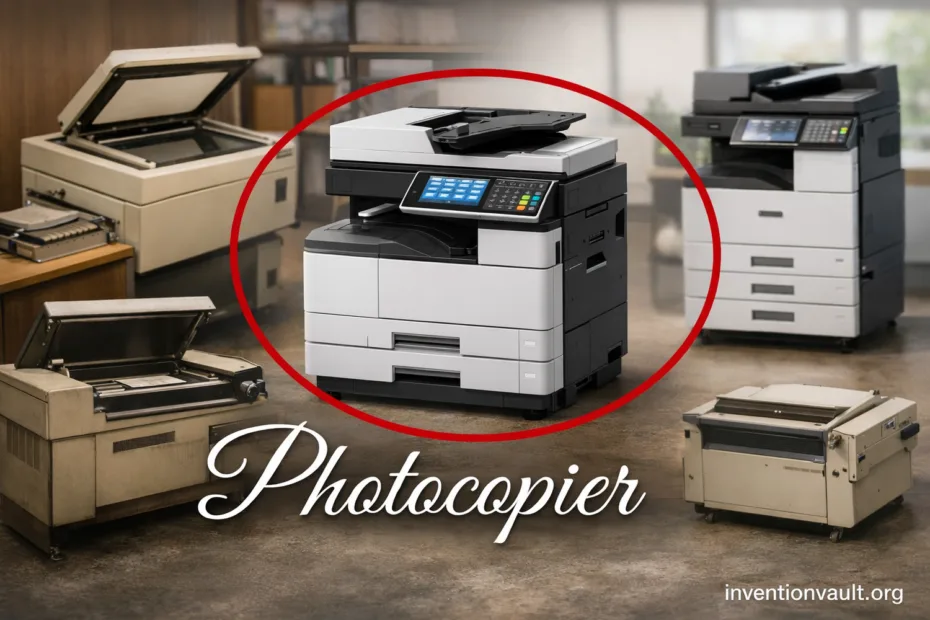
| Detail | Photocopier (Xerographic Copying) |
|---|---|
| Core Purpose | Create a fast paper duplicate of an original using light, electrostatic charge, and toner. |
| Key Inventor | Chester F. Carlson, credited with xerography (first successful demonstration in 1938). |
| Early Breakthrough | The first xerographic image is often cited as the handwritten note “10-22-38 Astoria” made during Carlson’s 1938 experiment. |
| Commercial Milestone | Xerox 914 (introduced in 1959) popularized plain-paper photocopying at scale. |
| Primary Process Name | Xerography (a form of electrophotography). |
| Main Subsystems | Optics/Scanner, photoreceptor drum/belt, charging unit, developer/toner, transfer, fuser, paper handling. |
| Consumables | Toner (powder or polymerized), drum/belt (wear item), fuser components, occasionally waste toner container. |
| Common Output Types | Monochrome (black), color (CMYK toners), duplex (two-sided), collated sets. |
| Modern Evolution | Most “copiers” are now digital copiers (scanner + printer engine), often sold as MFP devices. |
| Where You Still See Them | Offices, schools, copy centers, medical and legal admin, and high-volume print rooms. |
Photocopiers turned document duplication into a fast, dependable routine: place a page on glass, press a button, and get a clean copy within seconds. Under the hood, a modern copy machine is a carefully timed system that uses light, static electricity, and toner to “print” an image without ink.
- What A Photocopier Actually Does
- How Xerography Creates A Copy
- Step-by-Step: From Original To Paper
- Key Parts and Materials
- Photoreceptor Drum or Belt
- Toner and Developer System
- Transfer And Separation
- Fuser Unit
- Analog Copiers and Digital Copiers
- Color Photocopiers and How They Differ
- Common Color Architectures
- High-Volume Production Copiers
- Specs That Truly Affect Real-World Copying
- Before Photocopiers: Other Ways People Duplicated Documents
- Inside The Copier: Image Quality Decisions You Can See
- Common Artifacts and Their Usual Causes
- Paper Handling Features That Enable Fast Duplication
- Automatic Document Feeder
- Duplex And Collation
- Photocopier Variations You May Encounter
- Why Photocopiers Became So Widely Trusted
- What It Changed In Daily Work
- Short Glossary Of Copier Terms
- Photocopier Maintenance That Protects Copy Quality
- Good Practice Items That Keep Copies Clean
- References Used for This Article
What A Photocopier Actually Does
A photocopier reproduces the visible pattern on an original page—text, lines, and tones—by building an image from electrical charge and then locking it onto paper with heat. It’s designed for speed, consistency, and repeatability, especially when you need dozens or hundreds of copies that look the same.
At its heart, xerography is a controlled dance of light, charge, and toner.
How Xerography Creates A Copy
The classic photocopy method is xerography. A photoreceptor (usually a drum or belt) is first given a uniform electrical charge. Then the original page is scanned with bright light; the bright areas discharge the photoreceptor, while darker marks keep their charge, forming a precise electrostatic image.
Step-by-Step: From Original To Paper
- Charge the photoreceptor so it can hold an image made of electrical potential rather than ink.
- Expose the photoreceptor using light from the scanned original; the result is a detailed charge pattern.
- Develop the image by applying toner that is attracted to the charged regions (this is where the copy becomes “visible”).
- Transfer the toner image onto paper using charge control so the toner moves cleanly from drum to sheet.
- Fuse the toner with heat and pressure, creating a durable copy that won’t brush off.
- Clean and erase the photoreceptor so the cycle can repeat for the next page.
Original Page
   ↓ (scan/light)
Photoreceptor Charge Image
   ↓ (toner develops)
Toner Image On Drum/Belt
   ↓ (transfer)
Toner Image On Paper
   ↓ (fuse)
Finished Copy
That sequence happens quickly—often many times per minute. Its core idea is simple: use light to create a charge map on a drum, then use toner to reveal teh image. The challenge is making every step stable, quiet, and accurate, even when paper weight or humidity changes.
Key Parts and Materials
Photoreceptor Drum or Belt
The photoreceptor is the “canvas.” It must hold an even charge, respond predictably to light, and release toner during transfer. Drums and belts wear over time, so many machines track their life to protect print quality.
Toner and Developer System
Toner is a fine powder or engineered polymer that melts and bonds to paper. The developer system controls how toner is delivered, preventing uneven density, specks, or washed-out text. Good toner control keeps small fonts crisp.
Transfer And Separation
During transfer, the machine uses carefully tuned charge so the toner leaves the drum and lands on paper. Separation is just as important—paper must peel away cleanly to avoid smears. This is where paper type and humidity matter more than people expect.
Fuser Unit
The fuser applies heat and pressure so toner becomes part of the sheet. Different fuser designs balance warm-up speed, energy use, and reliability. If a copy feels powdery, the fuser temperature, pressure, or media setting may be the first place to check.
Analog Copiers and Digital Copiers
The word photocopier covers two major eras. Older machines were analog copiers: the image of the original was projected onto the drum using optics and mirrors, and the copier duplicated it directly. Modern machines are usually digital copiers: the original is scanned into data, then printed by a xerographic engine (or another print engine) with image processing that improves edges and controls tone curves.
| Type | How It Forms The Image | Why It Matters |
|---|---|---|
| Analog Xerographic Copier | Optical projection from original onto photoreceptor | Simple workflow, but fewer controls for image cleanup and scaling. |
| Digital Copier (Most Common Today) | Scan to data, then print via laser/LED exposure | Better sharpness, scaling, duplexing, and consistent density control. |
| MFP (Multifunction Device) | Digital copier + printing + scanning + often faxing | One device handles copy, scan, and network printing with unified paper handling. |
Color Photocopiers and How They Differ
A color photocopier typically uses four toners—cyan, magenta, yellow, and black—building the final image by layering them precisely. That demands tighter registration, smarter calibration, and more complex control of temperature and fusing. When color is stable, charts and brand colors look consistent across long runs.
Common Color Architectures
- Single-pass designs apply CMYK in one travel of the paper path, supporting high pages-per-minute.
- Multi-pass designs may build color in repeated steps, often simpler mechanically but slower for heavy color.
- Automatic calibration uses internal sensors to maintain color balance and reduce drift over time.
High-Volume Production Copiers
In print rooms and copy centers, production copiers are built for long duty cycles and predictable throughput. They emphasize paper feeding, finishing (stapling, folding, booklet making), and robust imaging components that keep registration tight over thousands of sheets. Speed matters, but so does how calmly the machine handles thick stock and mixed media trays.
Specs That Truly Affect Real-World Copying
- Pages Per Minute (ppm): sustained speed on typical jobs, not just peak bursts.
- First Copy Out Time: how quickly the first sheet lands in your hands after you start.
- Duty Cycle: the workload range the machine is designed to handle with steady quality.
- Resolution: impacts fine text and line art; paired with image processing for clarity.
- Paper Path Design: straighter paths handle thick media with fewer marks and fewer jams.
Before Photocopiers: Other Ways People Duplicated Documents
Photocopiers didn’t appear in a vacuum. Offices long relied on carbon paper, stencil duplicators, and other techniques. What photocopying added was clean duplication without retyping or messy chemicals, plus quick repeats that preserved layout and spacing with near-identical geometry.
| Method | What It Was Good At | Typical Limit |
|---|---|---|
| Carbon Paper | Immediate duplicates while typing; simple and cheap | Quality drops across layers; not ideal for clean archives |
| Stencil/Mimeograph | Many copies from one stencil; strong for forms | Setup effort; weaker for photos and fine detail compared to xerography |
| Photocopy (Xerography) | Fast, faithful layout reproduction on plain paper | Requires a machine, toner, and maintenance for consistent output |
| Scan + Print Workflow | Digital storage plus printing; easy sharing and editing | Depends on file handling; printing still needs an engine for paper output |
Inside The Copier: Image Quality Decisions You Can See
Copy quality is shaped by many small choices. Exposure control affects whether light text stays readable. Toner density affects whether blacks look deep or gray. Paper selection affects how the fused toner sits on the sheet. When a copier is tuned well, thin lines stay sharp and backgrounds stay clean, even on repeated runs.
Common Artifacts and Their Usual Causes
- Light copies: density setting too low, toner supply issue, or aging drum reducing charge response.
- Gray background: exposure too high, optics dirty, or humidity affecting toner behavior.
- Repeating marks: drum surface defect (often repeats at a consistent interval tied to drum circumference).
- Smearing: fuser temperature/pressure mismatch for the chosen media; heat control matters.
- Misaligned color: calibration drift or registration issue; shows as colored shadows on text and edges.
Paper Handling Features That Enable Fast Duplication
Speed is not only about the imaging engine. A photocopier becomes truly productive when paper movement is smooth and predictable. Features like an automatic document feeder (ADF) and duplex unit reduce manual work while keeping the output consistent, neat, and ready to file.
Automatic Document Feeder
An ADF pulls pages automatically, enabling rapid copying of multi-page originals. Many units also support two-sided scanning, which pairs naturally with duplex copying for booklets and packets.
Duplex And Collation
Duplex flips or re-feeds paper to print both sides, cutting paper use while keeping sets compact. Collation organizes pages into complete sets automatically, which is vital for training packs and meeting handouts.
Photocopier Variations You May Encounter
“Photocopier” can mean different machines depending on environment and volume. Some are compact office units built for daily administration. Others are heavy-duty systems built for continuous workloads. The core xerographic idea remains, but the engineering priorities change—noise control, warm-up time, finishing, or ultra-stable long-run density.
- Desktop Office Copiers: balanced for moderate volume, quick access, and simple controls with low maintenance.
- Floor-Standing Department Copiers: stronger paper options, faster throughput, and larger toner capacity for shared use.
- Production Copiers: high duty cycles, advanced finishing, and stable color systems aimed at repeat jobs and consistent output.
- Monochrome-First Copiers: optimized for crisp text and low cost per page, ideal for forms and documentation.
- Color Copiers: tuned for graphics, charts, and mixed media, with calibration as a core feature.
Why Photocopiers Became So Widely Trusted
The photocopier earned its place because it made duplication routine without demanding specialized skill. The machine is forgiving: it can reproduce typed pages, handwriting, stamps, diagrams, and many kinds of printed originals. That reliability—paired with speed and repeatability—is why “make a copy” became a standard office action across decades.
What It Changed In Daily Work
- Document sharing became instant: teams could work from identical pages without delaying the workflow.
- Forms and records could be duplicated cleanly, supporting consistent filing and repeatable administration.
- Error recovery improved: a single clean master could be copied again and again with stable layout fidelity.
Short Glossary Of Copier Terms
Open To See Key Terms
- Xerography: copying method using light, charge, and toner on a photoreceptor.
- Photoreceptor: drum or belt that holds the electrostatic image.
- Toner: material that forms the visible image and is fused to paper with heat.
- Fuser: heated rollers or belt system that bonds toner to paper.
- ADF: automatic document feeder for fast multi-page copying.
- Duplex: copying/printing on both sides of the sheet.
- Duty Cycle: designed monthly workload range for consistent operation.
Photocopier Maintenance That Protects Copy Quality
Photocopiers stay dependable when the essentials are cared for: clean scanning glass, correct paper storage, and timely replacement of wear items like drums and fuser parts. Many machines provide internal counters and prompts, helping users keep output quality stable without guesswork. Small habits—like using the right media setting—can preserve both clarity and component life.
Good Practice Items That Keep Copies Clean
- Keep the platen glass and ADF scanning strip clean to avoid lines and streaks.
- Store paper flat and dry so feeding remains smooth and registration stays stable.
- Use correct paper weight settings so the fuser bonds toner properly without excess heat.
- Replace consumables on schedule to protect density and prevent background haze.
References Used for This Article
- Library of Congress — Chester F. Carlson Papers: Archival materials documenting the inventor of xerography and the origins of photocopying.
- United States Patent and Trademark Office — U.S. Patent Full-Text Databases: Official patent records supporting the technical foundations of xerographic copying.
- Smithsonian National Museum of American History — Xerox 914 Copier: Museum documentation of the first commercially successful plain-paper photocopier.
- IEEE Engineering and Technology History Wiki — Xerography: Engineering-focused overview of the electrophotographic copying process.
- Encyclopaedia Britannica — Xerography: Authoritative explanation of the principles and development of xerographic imaging.
- ScienceDirect — Electrophotography: Academic summaries covering toner-based imaging systems used in copiers and printers.